How To Create & Sell E-Books Online In Minutes (Without Writing A Single Word)
At no additional cost to you, as an affiliate of Amazon and other organizations, I may earn money or products from the companies mentioned in this post. When you use my links, you also support this single mom. Thanks! Read the privacy policy and disclosure here.
Writing Books Just Got Easier!
So, you want to make money selling books online. But between working, parenting, trying to remember where you left your keys, and attempting to maintain a social life? Sitting down to write a full-blown e-book from scratch is not happening.
And honestly, we are not about to be out here typing chapters like it’s dial-up internet season. Thank goodness life upgraded.
Here’s the real tea: AI can now write your entire book in minutes, including a title, chapters, images, QR codes, the whole thing. All while you sip your iced coffee and mind your business.
And I’m not talking about just using ChatGPT and copy-pasting these books. Nope. There’s an entire platform called Designrr, and inside it lives a magical little feature called WordGenie that will turn a simple idea into a fully-formatted e-book you can sell forever.
And because I don’t like gatekeeping (and you’re here trying to get to the bag), I’m about to walk you through exactly how to do it, step-by-step.
Let’s do this!

WordGenie Will Write E-books for you!
Let’s be honest, passive income sounds good until you realize it still requires work. Creating an e-book from scratch? Researching? Editing? Designing the cover? Formatting? That’s stressful.
This is where WordGenie inside Designrr comes in.
Designrr doesn’t just help you build standard e-books. You can also:
✔️ Create audiobooks
✔️ Turn Google Docs into books
✔️ Transform PDFs into interactive flipbooks
✔️ Pull content from your blog posts or YouTube videos to auto-create books
Word Genie will literally write the entire book for you. You just guide it.
So if you’ve ever said:
“I’d write a book… I just don’t have the time.”
Congratulations — your excuse has officially expired.

Step 1: Pick Your Topic (AKA: What Are We Talking About?)
Once you open Word Genie, it’ll first ask you to choose a topic or niche. Since I’m always talking about earning coins online, I chose affiliate marketing. You can choose whatever makes sense for your audience — parenting, fitness, mindset, travel, skincare, budgeting, anything.
Then it’ll ask who your audience is.
This is where I kept it real:
I selected parents… but broke parents. Because if you’ve ever bought diapers, you know that budget is fighting for its life.
Word Genie then suggested a bunch of topic ideas, and the one that jumped out at me was:
Affiliate Income For Broke Parents: Strategies To Thrive On A Budget
If that’s not relatable, I don’t know what is.

Step 2: Choose The Tone (Yes — It Can Sound Like You)
You don’t want your e-book sounding like a robot who took an English class once in 2002. So Word Genie lets you pick the tone — friendly, emotional, professional, inspirational, humorous, etc.
Naturally, I chose humorous, because life is already stressful enough. We deserve jokes.
Then you choose your theme — business, self-development, digital marketing — and Word Genie gets to work.
Within SECONDS, it generated:
- 10 full chapters
- Multiple sections inside each chapter
- Clean, readable content that actually makes sense
But, before you run off into the sunset trying to sell your new masterpiece…
PLEASE PROOFREAD.
AI is cute and helpful, but not perfect. Sometimes it will randomly say something wild. Read through your book. Edit. Adjust. Make it sound like you. We don’t do sloppy money around here.
Step 3: Add Images Automatically
Here’s where I got impressed.
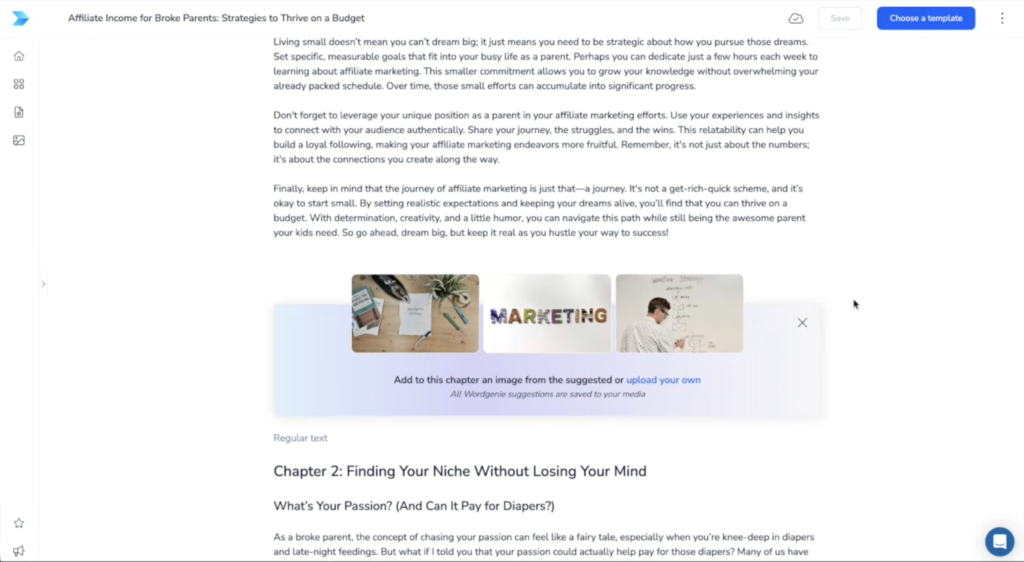
Designrr now lets AI suggest images for each chapter based on what your book is about. You don’t have to search endless stock photos or upload anything if you don’t want to.
You just:
✔️ Turn on “Add AI Images”
✔️ Review the suggested images
✔️ Swap any you don’t like
There are so many options to choose from.

Step 4: Choose Your Template & Customize It
Once your content and images are set, it’s time to choose a design template. Designrr has them all: simple, bold, minimal, fancy, colorful. I picked a clean one so the focus stayed on the words.
Then I customized:
- Title
- Subtitle
- Fonts
- Layout
- Images
- My name on the cover (because… branding)
And can we talk about QR codes real quick?
Because yes, you can literally add clickable QR codes inside your book so readers can:
- Visit your website
- Join your email list
- Book a call
- Shop your products
Game changer.
Step 5: Publish As A PDF AND A Flipbook
When your book looks polished and ready? It’s time to publish.
My Designrr plan gave me two options:
📘 Standard PDF
Great for selling on your website, Etsy, Stan Store, Shopify, Gumroad, etc.
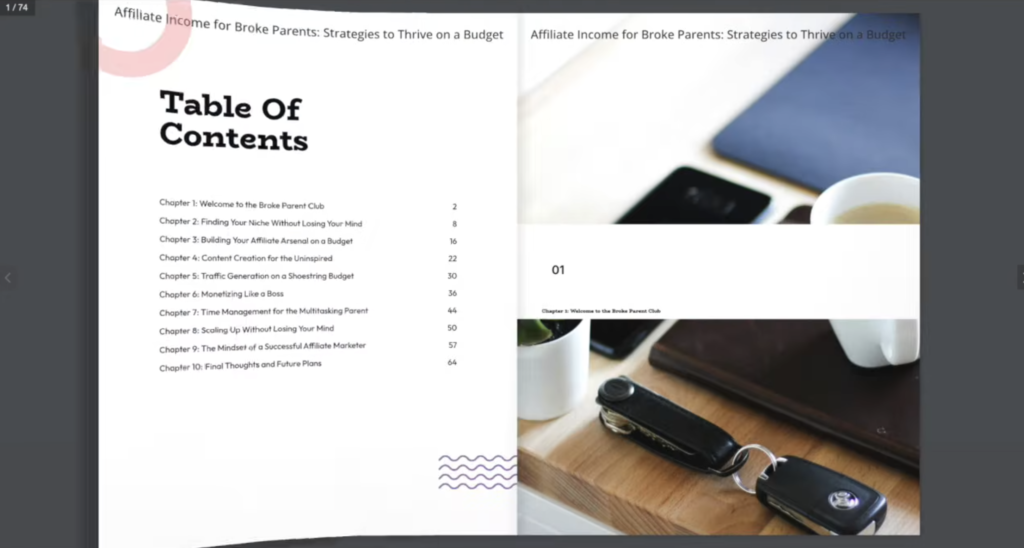
📖 Interactive Flipbook
This one is sexy. It literally flips like a real book on-screen. You get a link you can share — perfect for bonuses, memberships, lead magnets, and digital experiences.
And yes, you get BOTH.
You don’t even have to sit there waiting, Designrr emails you when your files are ready.
We love efficiency.
FYI, I have the Pro plan. The higher plan allows you to create a Kindle e-book version to sell on Amazon KDP.
How to Join Designrr…at a discount
Designrr normally costs $39/month, which adds up to $468 a year.
But listen to me carefully…
With my link, you can get:
LIFETIME ACCESS for $27
Yes, lifetime. As in forever. One time. No monthly. No subscription sneaking up on your bank account like “hey girl.”
You get access to everything I just showed you, for life.
You can literally build:
- E-books
- Lead magnets
- Digital workbooks
- Journals
- Guides
- Courses
- Flipbooks
- Audiobooks
And resell them again… and again… and again.
Or hey, ignore my link and go pay $468 a year.
I mean, if you like pain.

Writing books with AI
When using AI to write books, remember…
AI is a shortcut, not a replacement for effort. You still need to:
- Edit your content
- Understand your audience
- Market your book
- Deliver value
But the hard part? Writing a whole book?
Handled.

Now… What Will YOU Create?
Here’s what I want to know:
- Have you ever heard of Designrr or Word Genie before now?
- What niche are you thinking about writing in?
- Would you do a flipbook or PDF?
And now that you know how to CREATE an e-book…
Do you actually know how to SELL it?
Trust me, your bank account will thank you.